The Family Wall Dashboard
A living, glanceable display that runs on a Mac mini and shows on the basement TV — weather, the family calendar, sleep & recovery, training, the home, and real daily news. No cloud, no subscriptions, and no AI tokens in the daily loop.
01 What it is
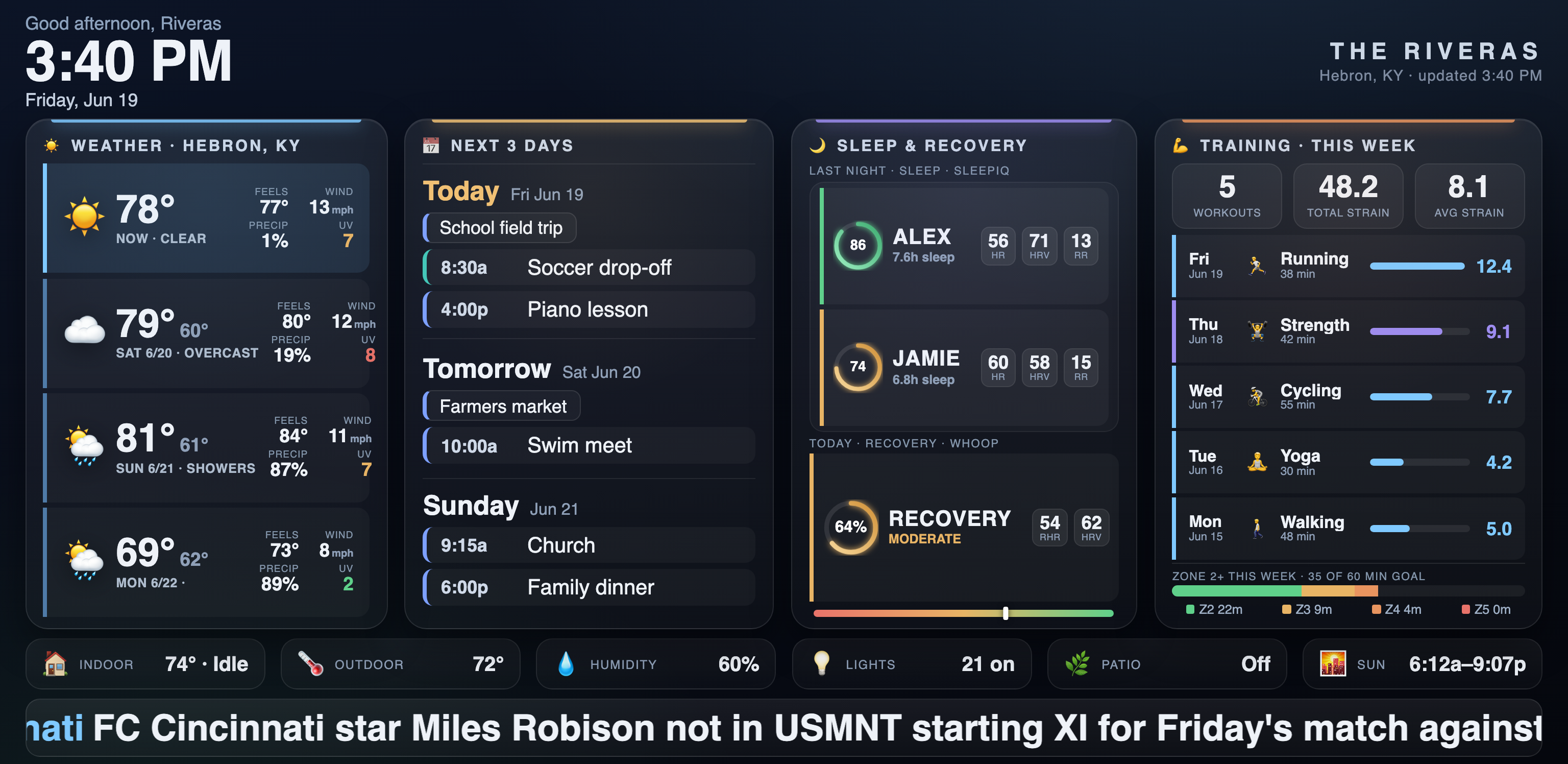
A single, dense HTML page generated fresh each morning and thrown full-screen onto a wall-mounted TV. Four cards carry the day's essentials — Weather, Calendar, Sleep & Recovery, and Training — over a strip of home stats and a four-category news band. It is built to stay on the wall all day and be readable from across the room.
☀️ Weather
Now plus a 3-day forecast — feels-like, wind, precip, UV — from Open-Meteo.
📅 Calendar
The next three days from the shared Google Calendar, all-day events and timed items.
🌙 Sleep & Recovery
Per-person sleep from the Sleep Number bed, plus WHOOP recovery with a live gauge.
💪 Training
This week's workouts from WHOOP — dated, named, with strain and time-in-zone toward a goal.
🏠 Home
Thermostat, humidity, lights and patio state from Home Assistant, plus sunrise/sunset.
📰 News
Top headlines in four lanes — Cincinnati, Tech & AI, Finance, Politics — from trusted feeds.
02 How it's hosted & fires to the TV
Everything lives on an always-on Mac mini. A tiny Python web server holds the page; a scheduled job opens it on the TV's browser and sends one key-press to go full-screen. The TV is a dumb display — it just points its browser at the mini over the home Wi-Fi.
03 Where the data comes from
The dashboard draws on six sources. Three refresh on their own every morning — weather, WHOOP, and the news — via small Python scripts on the mini. The calendar and home / sleep panels show the most recent pull from Google Calendar and Home Assistant. Everything is baked into one static page; if a source is down, that card falls back and the rest still renders.
04 How a day works
- 4:25 AM — quiet refresh. A
launchdjob pulls fresh news and WHOOP data and regenerates the page, so the file on disk is always current. - 8:30 AM, Mon–Fri — morning launch. The pipeline fetches news + WHOOP again, regenerates, then opens the page on the TV and sends
KEY_ENTERso it goes full-screen for the day. - All day — it just sits there. The page never reloads, so full-screen never drops. Only the on-screen clock and greeting tick forward in the browser.
- Next morning — repeat. One fresh, full-screen page every weekday, with no one touching the remote.
05 Notes for the curious
📐 Pixel-perfect
The TV's browser renders at exactly 1536 × 748. Every layout decision and screenshot is matched to that, so what's built is what shows.
🧱 One file
The whole dashboard is a single self-contained index.html — no build step, no framework, no external assets at runtime.
🔒 Stays home
Real family data never leaves the LAN. The page is served only on the home network; this public page uses sample data.
♻️ Self-healing
launchd keeps the web server alive across crashes and reboots, and the morning job re-establishes the display each weekday.
🩹 Graceful fallback
Each data source is independent. A down feed or API just thins one card; the rest of the wall renders fine.
🛰️ Reached anywhere
The mini is on Tailscale, so the dashboard and its scripts can be tended from a laptop on any network.